


Beyond Menu - Food Delivery
4.736.61K Reviews
App Specs
- Version
- 4.44
- Updated On
- License
- Free
- Downloads
- 1,000,000+
- Developer
- BeyondMenu
- Categories
- Food & Drink
- Platform
- Android, iOS
Screenshots
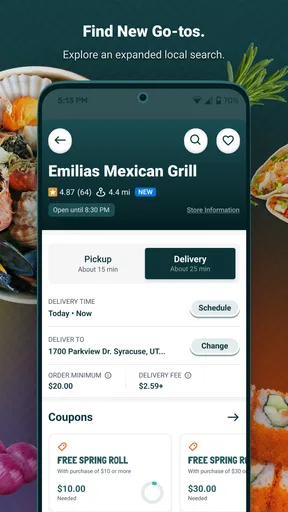
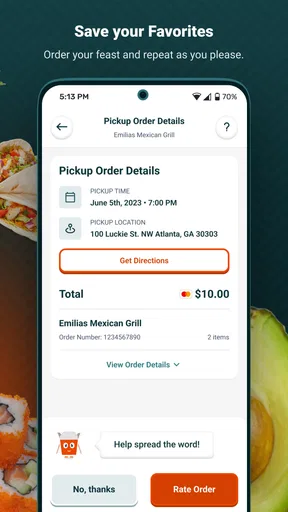

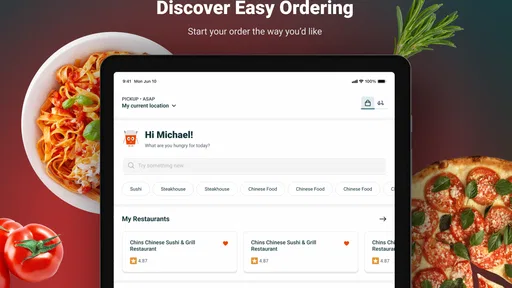
 Analysis by AppCompare
When I’m hungry and short on time, I want to know quickly whether I can find a nearby place that suits me and whether pickup or delivery makes more sense. Beyond Menu - Food Delivery is a free Food & Drink app from BeyondMenu, built around finding meals from local restaurants. Its focus is practical rather than elaborate: browse nearby choices, decide what sounds good, and place an order without calling around. That makes it most appealing when convenience matters more than comparing every possible restaurant in town.
Where ordering can get stuck
The point at which a food-ordering app can feel less straightforward is often the menu itself. A dish name may be familiar while its ingredients, portion, or preparation are not, so I’d pause to read the restaurant’s description before adding it to the cart. Special requests can help communicate a preference, but I wouldn’t treat a note as a guarantee that a kitchen can accommodate it. For an allergy or another essential dietary need, I’d contact the restaurant directly and confirm before ordering.
Restaurant choice is another practical wrinkle. A nearby result is not automatically the best fit: menu selection, opening hours, service options, and how long the order may take all matter. I’d compare a couple of suitable listings rather than tapping the first one, especially when ordering for a group. If the app doesn’t show a restaurant I expected to find, I’d check the location first and then consider that the business may not be available through the service in that area.
Setup checks before you browse
Before searching, make sure the location being used is the one where you want the food delivered or picked up. This matters when you’re ordering from work for later, helping someone at another address, or browsing while away from home. Check the address carefully before checkout; a correct restaurant choice paired with an old delivery address is still an avoidable mistake.
It also helps to decide early whether pickup or delivery fits the situation. Pickup can be a sensible choice if you are already nearby or want to avoid waiting at home, while delivery is more convenient when leaving is the problem. Availability depends on the restaurant and the area, so I’d treat the options shown for a particular place as the useful guide rather than assuming every restaurant offers both.
If you use the app regularly, keeping your device’s operating system compatible is a basic check: the current version is 4.41 and the minimum OS is 7.0. Beyond Menu is rated for Everyone, and it has been available since November 25, 2013. The app is free to install, but that does not mean the meal or any restaurant charges are free; review the order total and details shown at checkout before confirming.
A calmer way to choose and place an order
For a first order, I’d use the search and cuisine browsing to narrow the options, then open a restaurant’s menu and inspect the dishes that matter to me. That small pause is more useful than relying on a restaurant name or a dish photo alone. If I’m ordering for other people, I’d settle the main choices before adding items, check each customization as it goes into the cart, and review the full order once more before submitting.
Worth Reading Before You Choose

EA SPORTS FC Mobile 26 Is a Bigger Football Game, but It Takes Time

Flipboard Shows What News Apps Must Do Beyond the Feed

Switching to Android Auto Means Rethinking Your Driving Routine

Google Calendar Makes a Crowded Week Easier to Manage

Ludo King Makes the Most of the Minutes Between Plans

Baby Panda World Brings Quick Play to Modern Phones, but Its Game Library Feels Busy
Here’s a realistic example: after a long workday, I need dinner for myself and a family member, but we want different things. I’d look for a nearby restaurant with options that suit both of us, decide whether pickup is feasible, and add the meals separately so any requests stay attached to the right item. Before placing the order, I’d verify the address or pickup plan and make sure the total reflects what we actually chose. This is a simple workflow, but it prevents the common mix-up of ordering the right food for the wrong destination or overlooking a customization.
For a familiar meal, reordering can be a useful shortcut when the previous choice still fits. I’d still review the cart rather than assume every detail is unchanged: the restaurant, requested items, and delivery or pickup choice deserve a quick check each time. That brief habit keeps convenience from turning into an order you didn’t mean to repeat.
What to do when the process goes wrong
If a search result seems off, I’d first check the location and try a more specific cuisine or restaurant search. If a menu item or option is unclear, opening the restaurant’s listing again can help distinguish a choice that is genuinely unavailable from one that is simply easy to miss. If the cart looks wrong, I’d correct it before checkout instead of hoping the restaurant will infer what I intended.
When an order appears delayed or a status is not changing, I’d avoid placing a second order straight away. First, check the order information in the app and any notification already received; duplicating the order can create a separate problem. If the issue concerns preparation, delivery timing, or a requested change, the restaurant is often the most direct place to clarify what can still be done. For an app or account problem, use the available support route and explain the specific order or screen involved.
There is also a useful distinction between a trouble with the app and a trouble with the meal. A menu detail that needs clarification, a restaurant running behind, or an item prepared differently from what you expected may need to be resolved with the restaurant. A screen that will not load or an order that cannot be reviewed is a different kind of issue. Identifying which one you are dealing with makes the next step clearer and avoids spending time troubleshooting your phone when the restaurant needs to answer a food-related question.
How it fits alongside other ways to order
Compared with calling a restaurant, browsing in an app can make it easier to look through choices at your own pace and review what you have selected before submitting. A phone call may still be better when your request is complicated, you need to ask about ingredients, or you want a direct conversation about a timing constraint. I see the app as a convenient route for ordinary orders, not a replacement for a conversation when accuracy depends on detailed answers.
Compared with a broad restaurant-discovery or delivery service, Beyond Menu’s appeal is its straightforward local ordering focus. That can suit someone who already has a cuisine in mind and wants to browse nearby restaurants without turning dinner into a long research session. The trade-off is that no single ordering app should be assumed to show every restaurant or every option in a neighborhood. If a particular place is missing, or if you need a specific restaurant’s full range of choices, checking that restaurant’s own ordering channel or calling it may be the better move.
I’d also be realistic about ratings. The app has a 4.7 average from around 119,000 ratings, with about 36,000 written reviews and over one million installs. Those figures suggest many people have used it, but they cannot tell me whether one restaurant will be a good fit for my order tonight. I would use restaurant-specific details and my own priorities to choose, rather than treating the app’s overall rating as a promise about food quality or delivery speed.
Who will get the most from it
This app makes the most sense for people who often choose local takeout, want to compare nearby options, and value placing an order from their phone. It can also be handy when several people are deciding what to eat: browse first, agree on a restaurant, then build a cart with each person’s choices. The ability to return to a familiar meal can help on busy evenings, provided you take a moment to verify the details instead of ordering on autopilot.
I’d be less inclined to rely on it as the only route for a time-critical meal, a complex dietary request, or an order where a small customization has serious consequences. In those cases, a direct call gives you a chance to confirm the important details with the restaurant. It may also not suit someone who prefers to discover restaurants through a wider range of sources or who expects every local business to appear in one app. Its usefulness depends on the restaurants available around you and whether their menus match what you want.
The practical question of whether it costs anything to download is simple: the app is free. The more important question is what the selected meal and service will cost, so I’d inspect the final order details before confirming. If you are wondering whether you need to use delivery, you can look for pickup when a restaurant offers it; choosing between the two is part of making the order fit your evening, not a feature to assume is available everywhere.
First Impressions
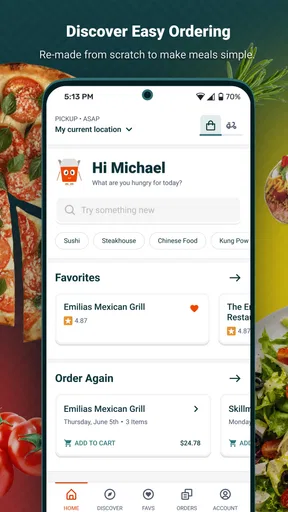
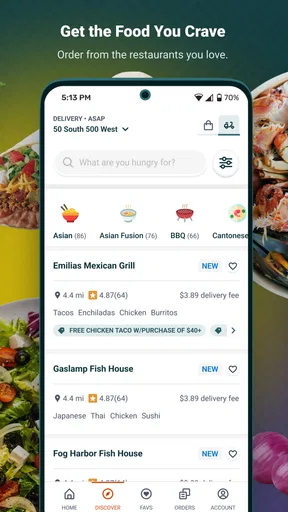
As soon as you open the Beyond Menu app, you’re greeted with a clean, intuitive interface. No clutter or unnecessary flashing banners. It’s all about getting you to your food as quickly as possible. The homepage presents you with a search bar and a list of your favorite cuisines. Craving Thai, Chinese, or maybe some Italian? It’s all just a few taps away.
The Ordering Experience
Alright, so I decided to test the waters with a classic—some good ol’ Chinese takeout. The app’s search function is slick. You can filter by cuisine, restaurant ratings, and even delivery time. I found a highly-rated spot nearby and browsed their menu. The app displays everything clearly, from detailed dish descriptions to customer reviews. You can even tweak your order with special requests. Want extra spicy? No problem. Hold the onions? Done and done.
Adding items to your cart is seamless, and checking out is a breeze. They offer multiple payment options, which is a lifesaver if you’ve misplaced your wallet but still have your phone handy. You can save your payment method for future orders, making the process even quicker next time.
Tracking Your Order
One of my favorite features is the real-time order tracking. Once you’ve placed your order, you can watch its journey from the restaurant to your doorstep. It’s like having a mini food reality show starring your dinner. The app sends you notifications at each step, so you know exactly when to expect that delicious knock at your door.
Exploring Features
Beyond Menu isn’t just about ordering food. They’ve got some nifty extras that make the app a keeper. For instance, there’s an option to make reservations directly through the app. Planning a night out? No need to juggle between apps or make awkward phone calls. Just reserve your table with a few taps.
Another cool feature is the ability to re-order your favorite meals. If you’ve found your go-to dish, you can reorder it with one tap. Perfect for those days when decision-making feels like climbing Everest.
User Experience
Overall, the user experience is super smooth. The app runs without a hitch, and I haven’t experienced any crashes or bugs. It’s fast, responsive, and doesn’t drain your battery like some other apps do. Plus, the customer service is top-notch. I had a minor issue with an order once, and their support team handled it promptly and professionally.
Final Thoughts
So, is Beyond Menu - Food Delivery worth a download? Absolutely. It’s perfect for those lazy days, busy nights, or whenever you’re in dire need of a delicious meal without the hassle. It’s more than just a food delivery app; it’s a reliable companion for all your culinary cravings. Whether you’re a foodie or just someone looking for a quick bite, Beyond Menu has got your back. Trust me, your taste buds will thank you.
Pros
- User-friendly interface makes ordering easy.
- Wide variety of restaurants to choose from.
- Real-time tracking of your order status.
- Secure payment options for peace of mind.
- Offers and discounts available regularly.
Cons
- Limited delivery areas in some regions.
- Occasional app crashes reported by users.
- Customer support response can be slow.
- Some restaurants have high delivery fees.
- No option for scheduled future deliveries.
FAQs for Beyond Menu - Food Delivery
What is Beyond Menu and how does it work?
Beyond Menu is a food delivery app available on both Android and iOS platforms. It connects users with local restaurants for convenient online ordering. By browsing the app, you can explore a variety of cuisines, check restaurant menus, and place orders for delivery or pickup. Payments can be made directly through the app.
Is Beyond Menu available in my area?
Beyond Menu serves a wide range of cities across the United States, but availability can vary based on location. To check if Beyond Menu is available in your area, download the app and enter your address. The app will list restaurants near you that offer delivery or pickup services through Beyond Menu.
What are the payment options available on Beyond Menu?
Beyond Menu offers multiple payment options to cater to user preferences. You can pay for your orders using credit or debit cards directly through the app. Some restaurants may also accept cash on delivery, but this option depends on the individual restaurant's policies.
How do I track my order on Beyond Menu?
Once you've placed an order through Beyond Menu, tracking your food delivery is straightforward. The app provides real-time updates on the status of your order. You will receive notifications about order confirmation, preparation, and delivery. Additionally, you can contact the restaurant directly for more detailed updates.
What if I have an issue with my order on Beyond Menu?
If you encounter any issues with your order, such as incorrect items or delays, Beyond Menu offers customer support to assist you. You can contact support through the app or directly reach out to the restaurant. It's important to report any problems promptly to ensure a quick resolution.


